

Connect Riddle to Claude (MCP)
Connect your Riddle account to Claude so it can create, analyze, and manage your Riddles from a plain-English prompt like "Build me a 5-question quiz on solar panels in German."
Setup takes about a minute: you add Riddle as a connector in Claude, sign in once, and you're done. No keys to copy or paste.
Good to know before you start:
- Where it works: Custom connectors work in Claude on web and desktop, not in the mobile apps yet.
- Plans: Creating, publishing, and managing Riddles works on every plan. Stats tools (views, submissions, breakdowns) require a Business or Enterprise plan.
- AI credits: AI generation tools (e.g. "Make me a quiz about X") use your account's AI credits, just like generating Riddles in the Creator. Ask "How much AI usage do I have left?" anytime to check your quota.
Connect Riddle in Claude
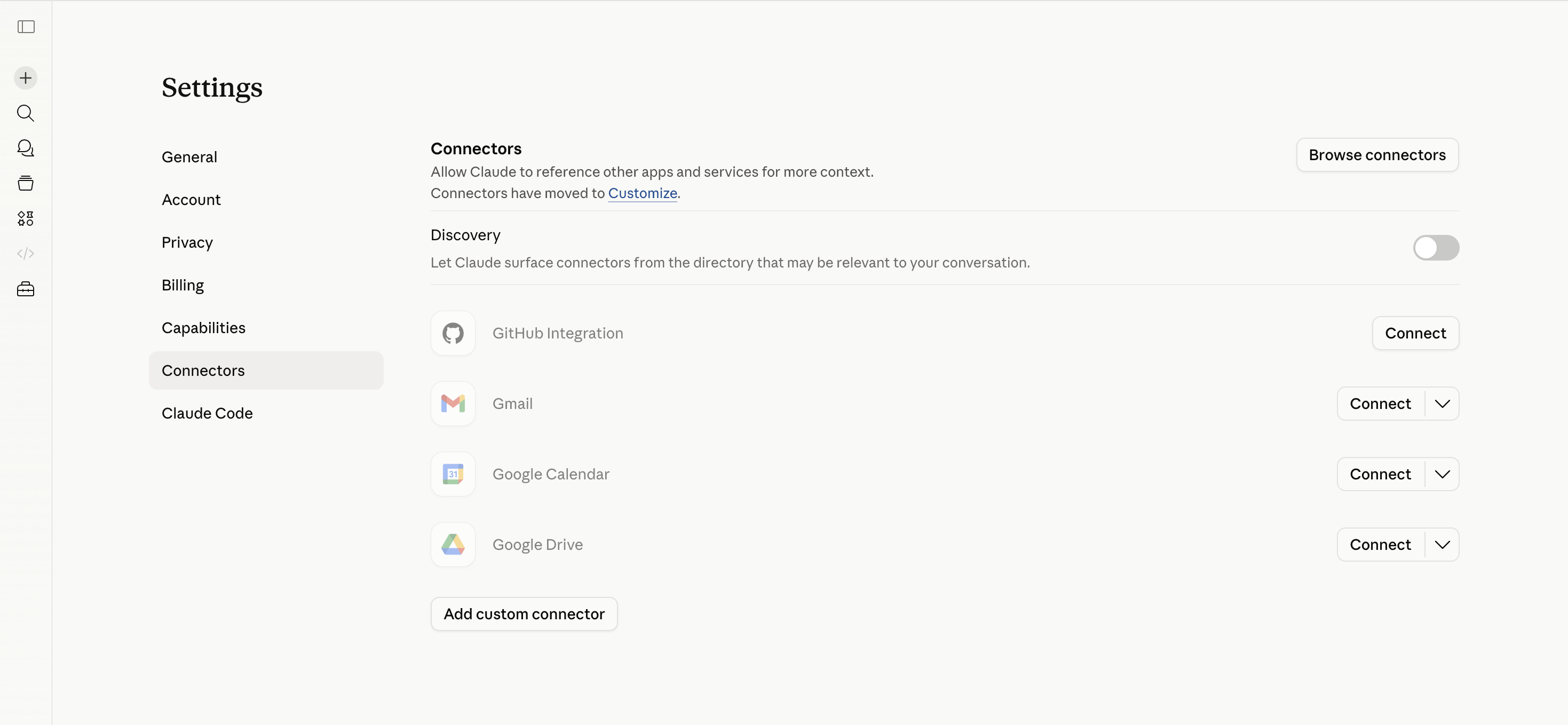
- In Claude, go to Settings → Connectors and click Add custom connector.
- Fill in the dialog:
- Name:
Riddle - Remote MCP server URL:
https://www.riddle.com/creator/api/v3/mcp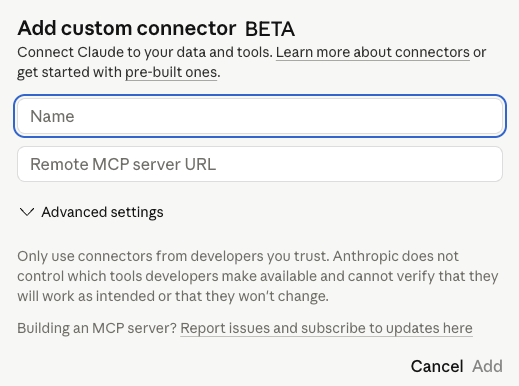
- Name:
- Click Add. Claude shows a Connect button for the Riddle connector.
- Click Connect to link your Riddle account with Claude. If prompted, log in to Riddle.
That's it – Claude is now connected to your Riddle account through a secure sign-in. Each user authorizes with their own Riddle account, so there's no key to embed or share.
Try it out
Open a new Claude conversation. Make sure the Riddle connector is toggled on for that chat – you'll find it via the connector icon below the chat input. Then ask:
"Show me my last Riddle."
If Claude returns one of your Riddles, you're set. (If not, see Troubleshooting below.)
Now try anything you'd normally do in Riddle:
- "List my last 5 Riddles."
- "Create a quiz about climate change with 7 questions in English."
- "Show me the stats for my 'Brand awareness quiz' from the last 30 days."
- "Publish the Riddle named 'Holiday giveaway 2026'."
Claude will pick the right tool and carry out the action in your account.
Best practices: Get top results with fewer tokens
How you prompt directly affects speed, accuracy, and token cost. These five tips give you the biggest wins.
1. Be specific upfront
Instead of "Make a quiz about marketing", try:
"Create a 5-question quiz on email marketing best practices, in English, single-choice answers, with a results page that shows a score."
The more constraints you give in the first prompt, the fewer back-and-forth turns you need.
2. Provide IDs or filter the scope
Pass UUIDs, exact names, projects, types, or date ranges whenever you have them:
- "Get the embed code for Riddle
1a2b3c4d-..." beats "Find the quiz I made about pets". - "Stats for the last 7 days in the 'Marketing' project" beats "All my stats".
This skips listing/searching steps and keeps responses small.
3. Pick the right kind of creation
Riddle's MCP can create content in two ways – and your phrasing tells the AI which to use:
- "Build a quiz with these exact 5 questions: …" → the AI uses the structured builder. Best when you already know your content.
- "Make me a quiz about X" → the AI lets Riddle's AI generation invent the questions. Best for fast, topic-based content.
Match your prompt to your intent: builder for precision, generation for speed.
4. Set the context once
State recurring requirements at the start of a conversation, not in every prompt:
"For all Riddles in this conversation: friendly tone, address the user with 'you', language German."
The AI will apply this to every Riddle it creates afterwards.
5. Iterate, don't restart
If something's off, refine it: "Change question 3 to multiple-choice", "Translate the result page to French". Iterating on an existing Riddle is faster and cheaper than deleting and starting over.
Troubleshooting
The connection or sign-in failed
In Claude, remove the Riddle connector and add it again, then click Connect and sign in. Double-check the URL is exactly https://www.riddle.com/creator/api/v3/mcp.
"I don't have access to project X" The connection only works for projects where your user has the right AI permissions. Ask your project admin to grant access.
Claude doesn't seem to use the connector Check that the connector is enabled in your Claude conversation. Click the connector icon below the chat input and make sure "Riddle" is toggled on.
Want to disconnect? Remove the Riddle connector in Claude to revoke its access to your account.
Still stuck? Reach out to our support team via the support chat or via email.
Using a different AI assistant, or prefer a key?
The sign-in setup above is the easiest way to connect Claude. If you use another MCP-compatible client (Cursor, Cline, a custom agent, …), or you'd rather authenticate with an MCP key embedded in the connector URL, see the technical MCP guide – it covers key-based authentication and lists every available tool and resource.
Next steps
- Browse the full list of MCP tools and resources – for a complete reference of what Claude can do via the MCP.
- Look at the API specification – every MCP tool maps to an API endpoint, so the API docs explain the parameters and response structure in detail.
- Set up AI permissions for your team – give the right people access to the right projects.