

• HELP CENTER
  • API
  • EXAMPLES
  • ACADEMY
  • RIDDLE CREATOR
    • First steps
    • Your free trial
    • Top tips
    • Content types
      • Create a quiz
      • Quiz blocks
      • Single-select
      • Multi-select
      • Tap and find
      • Order it
      • Type the answer
      • Spot the difference
      • Flashcard
      • Typerush
      • Guess it
      • Question Bank
      • Create a poll or survey
      • Poll and survey blocks
      • Single-select
      • Multi-select
      • Reaction poll
      • Upvote
      • Order it
      • Swiper
      • Likert / Matrix
      • Promoter Score
      • Rate it
      • Tier List
      • This or That
      • Question Bank
      • Create a minigame
      • Minigame blocks
      • Slot machine
      • Wheel of fortune
      • Sudoku
      • Crossword
      • Minesweeper
      • Create a personality quiz
      • Personality quiz blocks
      • Single-select
      • Multi-select
      • Scoring
      • Create low/medium/high results
      • Custom CTAs for personality outcomes
      • Make a compelling personality quiz
      • Create a predictor
      • Predictor blocks
      • Guess the score
      • Pick the winner
      • Configure results and scoring
      • Create a leaderboard
      • Configure scoring
      • Customize the display
      • Leads and entries
      • Create a story
      • Story content blocks
      • Create a form
      • Form content blocks
      • Customize form fields
      • Create a Question Bank for quizzes
      • Create a Question Bank for polls and surveys
      • All Riddle blocks
      • Prompts
      • Monetization
      • Forms
      • Personal details
      • Other content blocks
      • Other form blocks
      • Text input
      • Question Bank
      • Time
      • Result blocks
      • Result page
      • Redirect to URL
      • Configure results
      • Branching logic for questions
      • Branching logic for results
      • Navigate branching logic
    • Create a Riddle with AI
    • Create a Riddle from URL
    • Create a Riddle from file upload
    • Convert blocks
    • Guesses and lives
    • Shuffle answers
    • Use dynamic variables
    • Your templates
    • Organize your Riddles
    • Switch from Riddle 1.0 to 2.0
    • Embed placeholder
    • Riddle in a Riddle
    • Image sizes and ratios
    • Customize the design
    • Change the block style
    • Change the font
    • Edit an image
    • White label your Riddle
    • Your own media library
    • Switch to new standard layout
    • Rich text editor
    • Create buttons
    • Change palette via data layer
    • Use global colors on result page
    • Your Riddle's status
    • Your Riddle landing page
    • Embed in Emails
    • Add domains to your whitelist
    • Embed your Riddle
    • Embed a Riddle on Wix.com
    • Embed a Riddle on WordPress
    • Embed a Riddle on Typo 3
    • Embed advanced
    • Embed troubleshooting
    • Make your Riddle landing page full screen
    • General settings
    • Branding
    • Monetization
    • Timer
    • Block results
    • Security
    • Quiz right and wrong answers
    • Results
    • Enhance security
    • Intro to lead generation
    • Send leads to Google Sheets
    • Send leads to AWeber
    • Send leads to ActiveCampaign
    • Send leads to a webhook
    • Send leads to Mailchimp
    • Send automated emails
    • Send leads to Zapier
    • Send leads to Brevo
    • Send leads to Salesforce
    • Send leads to ApiX-Drive
    • Search for leads
    • Failed leads
    • Delete leads from a Riddle
      • Set up DOI
      • Set up DOI via OTP
      • Set up DOI via OTP (SMS)
      • Save DOI-unconfirmed leads
    • Pick a winner (Raffle)
    • Data layer
    • Google Analytics
    • Google Tag Manager
    • Matomo
    • Facebook Meta Pixel
    • Adobe Analytics
    • Custom tracking
    • JS Events
    • CSS editor
    • CSS code snippet examples
    • Manage your Riddle stats
    • Overview
    • Breakdown
    • Leads & CTA
    • Audience
    • Timezones
      • Connect to Google Looker Studio
      • FAQ and troubleshooting
    • Log in to Riddle
    • Update personal data
    • Change your password
    • Manage your subscription
    • What happens after the free trial or when I cancel my account
    • All subscription plans - explained
    • Activate two-factor authentication with Google Authenticator
    • Your projects
    • Your user seats
    • Your user roles
    • Use project presets
    • Transfer a Riddle to a different project
    • Global "Publish" settings
    • Accessibility at Riddle
    • Accessibility technology
    • Localize your Riddle
    • Website languages
    • Company data for emails
    • Customize email design
    • SMTP

Predictor blocks

There are two predictor blocks you can add to your predictor. You can combine multiple blocks in a single predictor.

Guess the Score

Select two teams or names and let your audience predict the final score or numerical result.
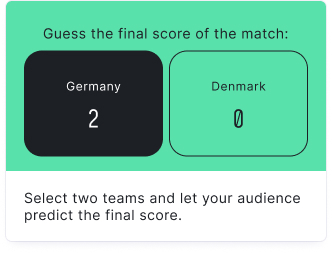
guess the score block

Learn more about the Guess the Score block


Pick the Winner

Ask a question and let your audience choose just one winner or option.
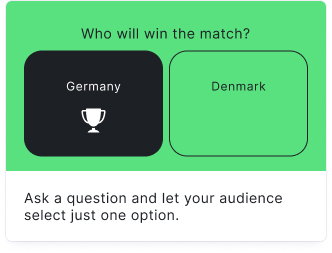
pick the winner block

Learn more about the Pick the Winner block

PredictorCreate a predictor
PredictorGuess the score
Table of Contents
  • Guess the Score
  • Pick the Winner
BlogAPIImprintTerms of ServicePrivacy Policy