

MCP
The Model Context Protocol (MCP) is a standard that lets AI models and agents call external tools and APIs. Riddle's MCP exposes our API to AI agents, so any action you can do via the API – such as listing, building, generating, and analyzing Riddles – can be triggered from an AI chat.
This MCP version is an alpha: not all Creator/API functionality is covered yet (e.g. updating, adding, or removing Riddle blocks). More tools are coming, stay tuned.
How to use
When using the Riddle MCP, you have two options for authentication:
- Preferred: Via public MCP URL in Claude (using the CIMD (Client ID Metadata Document) protocol)
- Via MCP key embedded in the URL
Via public MCP URL in Claude
- To add the Riddle MCP to your Claude account, navigate to Settings > Connectors > Add custom connector.
- To add the Riddle MCP to your Claude organization, navigate to Organization settings > Connectors > Add > Custom > Web connector.
In both cases the following dialogue will show:
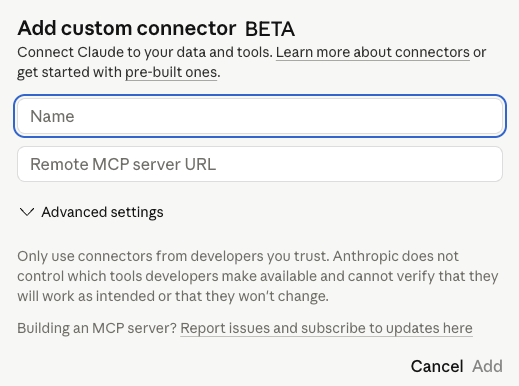
Enter the following:
- Name: Riddle MCP
- URL:
https://www.riddle.com/creator/api/v3/mcp
After clicking on add, you are almost ready to use the MCP in your Claude chats: Click on connect afterwards to link your Riddle account with Claude and if necessary, you'll have to log in. Once you're done with this, you can try asking Claude to list the latest, published Riddles from your account to test the connection. You can also use the whoami tool to verify your account and project access.
Via MCP key
If you wish to use the MCP with an MCP key, create one on the API keys page (see the Authentication guide for details). Please make sure to pick a MCP key – regular API keys will not work and will return an error. Personal MCP keys are best suited: they give you access both to your personal project and to all projects in which you have the corresponding AI permissions. If you can only create normal API keys, your user role is missing the required permissions – ask a project administrator to grant them or to issue an MCP key for you.
Once you have your key, append it to the MCP URL as a path segment: https://www.riddle.com/creator/api/v3/mcp/[MCP_KEY]
Replace [MCP_KEY] with your actual key, then add this URL as a custom connector in Claude (same steps as above).
Please note that accessing the MCP via a configured MCP key is inferior to the CIMD option. It requires you to embed your key in the URL, and it is less flexible: you need to create a new MCP key for every Riddle account you want to access. With CIMD, each user authorizes with their own Riddle account instead, so no account has to be pre-configured in the URL.
Available Tools & Resources
Note: You can use standard MCP functionality to list tools and resources available to the model; this will include more verbose information, e.g. API parameters. Below is a short summary, but make sure to fetch the MCP's current capabilities to get the most up-to-date information.
Tools (32)
The 32 tools fall into six categories:
| Category | Tools |
|---|---|
| Utility & Account | 2 |
| Projects | 2 |
| Riddle management | 9 |
| Builder API | 7 |
| AI generation | 7 |
| Statistics | 5 |
Utility & Account (2)
Test connectivity and check the context of your API key.
| Tool | Description |
|---|---|
| ping | Connectivity and authentication test – simply returns "Pong". |
| whoami | Returns information about the current API key: the authenticated user (ID, email, name) and the linked project/team, if any. Useful to verify authentication and retrieve your user ID or project ID. |
Projects (2)
List projects and fetch project details.
| Tool | Description |
|---|---|
| project_list | Lists all projects this token has access to. If it is a project API token, only the project linked to the token will be returned. |
| project_get | Fetches a single project by its project ID. |
Riddle management (9)
Find, read, and manage existing Riddles.
| Tool | Description |
|---|---|
| riddle_list | Paginated list of Riddles from a single project – filterable by type, status, tags, and search term; sortable. For Riddles across all projects, use riddle_account_list instead. |
| riddle_account_list | Paginated list of Riddles across the entire account – the personal project plus all team projects the user has access to. |
| riddle_get | Fetches a single Riddle by its UUID – including content, settings, and metadata. |
| riddle_rename | Renames a Riddle (new title by UUID). |
| riddle_publish | Publishes a Riddle – it becomes available via its public URL. |
| riddle_unpublish | Takes a Riddle offline – the public URL is no longer reachable. |
| riddle_delete | Deletes a Riddle by its UUID. Only Riddles created via the Builder API can be deleted. |
| riddle_get_embed_code | Returns the HTML embed code of a published Riddle. |
| riddle_qr_code | Generates a QR code (base64-encoded SVG) for a published Riddle. |
Builder API (7)
Create Riddles with structured parameters (blocks, results, logic, presets, publish settings).
| Tool | Description |
|---|---|
| riddle_builder_quiz | Builds a Quiz – question blocks (SingleChoice/MultipleChoice/TextEntry), results with percentage ranges, optional branching logic and leaderboard connection. |
| riddle_builder_poll | Builds a Poll – block types include SingleChoice, Matrix, Order, Upvote, NPS, RateIt, Swiper, and Reaction; optional branching logic. |
| riddle_builder_form | Builds a Form – FormBuilder blocks with field mapping (e.g. Email, Name); result page with dynamic variables such as %fieldname. |
| riddle_builder_personality | Builds a Personality quiz – questions with score arrays per answer, at least 2 personalities with title/description/media. |
| riddle_builder_predictor | Builds a Predictor – blocks of type PickTheWinner or GuessTheScore, optional leaderboard connection. |
| riddle_builder_minigame | Builds a Minigame – SlotMachine, WheelSpinner (win/loss/free spin with percentages), or Sudoku. |
| riddle_builder_leaderboard | Builds a Leaderboard – connects up to 10 Quizzes, Predictors, or Minigames (Name and Email fields required); optional email validation. |
AI generation (7)
Generate Riddles from a topic or URL via the Riddle AI. Processing is asynchronous – the returned UUID can be used with riddle_get to check the status. Check riddle_aiGenerate_usage first to ensure credits are available.
| Tool | Description |
|---|---|
| riddle_aiGenerate_quizFromTopic | Creates a Quiz from a topic – difficulty (easy/medium/hard), language, 1–10 questions. |
| riddle_aiGenerate_quizFromUrl | Creates a Quiz from a URL – the content is scraped and turned into questions. |
| riddle_aiGenerate_quizFromUrls | Creates a Quiz from up to 5 URLs – the contents are combined to generate questions. |
| riddle_aiGenerate_pollFromTopic | Creates a Poll from a topic – language, 1–10 questions. |
| riddle_aiGenerate_pollFromUrl | Creates a Poll from a URL – the content is scraped and used to generate poll questions. |
| riddle_aiGenerate_personalityFromTopic | Creates a Personality quiz from a topic – configurable number of personalities, attributes, and questions. |
| riddle_aiGenerate_usage | Returns the current AI usage and maximum allowed usage for the authenticated user. |
Statistics (5)
Views, starts, and submissions on user, project, and Riddle level.
| Tool | Description |
|---|---|
| stats_fetch | Aggregated stats (views, starts, submissions) for a single period – namespace: project, user, or riddle; omit the dates for all-time stats. |
| stats_overview_fetch | Stats in daily intervals for a given date range – ideal for dashboards, graphs, and trend analysis. |
| stats_riddle_breakdown | Detailed breakdown for a specific Riddle – titles, answer choices, views, time spent, and submissions. |
| stats_project_breakdown | Stats breakdown for a specific project. |
| stats_user_breakdown | Stats breakdown for the authenticated user across all accessible projects – requires a user API key (will fail with project API keys). |
Resources (6)
| Resource | URI | Description |
|---|---|---|
| getting-started | riddle://reference/getting-started | Overview of the Riddle MCP server: available tool categories, common workflows, and authentication model. |
| riddle-types | riddle://reference/riddle-builder/riddle-types | All 7 Riddle types with their required/optional build fields, result structure, and documentation links. |
| block-types | riddle://reference/riddle-builder/block-types | Question and content block types per Riddle type with required properties and item formats. |
| form-field-types | riddle://reference/riddle-builder/form-field-types | All 15 form field types for the FormBuilder block with their properties and configuration options. |
| result-blocks | riddle://reference/riddle-builder/result-blocks | All 9 result page block types with their properties, format options, and styling configuration. |
| ai-languages | riddle://reference/ai/languages | All available language codes for AI Riddle generation (used in the "language" parameter of riddle_aiGenerate_* tools). |
Builder capabilities
The riddle_builder_* tools do more than their short descriptions suggest. Beyond the required title and blocks, most builder tools accept optional parameters that unlock the same power available in the Creator:
- Branching logic (
logic): Define a conditional flow over your blocks instead of a fixed linear order – route users to different blocks based on their answers, and merge paths back together. Supported by Quiz, Poll, and Form. - Design presets (
preset): Base the Riddle on an existing design/preset and override settings such as color palette, language, "remember user", and auto-open/auto-close dates. Supported by all types except Leaderboard. - Publish automation (
publishSettings): Configure what happens on publish – double opt-in (DOI), email automation, tracking (pixels, analytics), data layer items, showcase visibility, and third-party integrations. Supported by all types except Leaderboard. - Leaderboard connections (
leaderboard/riddleConnections): Attach a Quiz, Predictor, or Minigame to one or more leaderboards on creation, or create a Leaderboard that connects to existing Riddles (which must have Name and Email fields). - Publish & queue (
publish,queue): Publish the Riddle immediately after creation instead of leaving it as a draft, and/or process the creation asynchronously. - Project targeting (
project): Create the Riddle in a specific project, in your personal project, or in the currently selected project.
Fetch the builder reference resources (riddle://reference/riddle-builder/*) or list the tools via standard MCP functionality to see the exact fields and formats for each of these.
Response Format
All responses from the MCP will adhere to the same schema as specified in the API docs for the corresponding endpoint.
E.g. the riddle_get tool will return a response with the same schema as the GET /riddle/{riddle_uuid} API endpoint, including all details about the riddle content, design, etc.
Troubleshooting
If you encounter any issues while using the MCP, here are some common troubleshooting steps:
- API authentication failed: Make sure you are using an MCP key (not a regular API key – re-create if in doubt) and that the URL contains the actual key in place of the
[MCP_KEY_]placeholder. - Missing API permissions: Check if your user role has the necessary AI permissions to access the desired projects and perform the intended actions. If you do not have permission to modify roles, ask your account administrators to grant you the required permissions.
... Still not solved? Please reach out to our support team with details about the issue, either via our support chat or via email, including any error messages received and the steps you have already taken to troubleshoot.
Next steps
Now that you have established a connection to the MCP and are familiar with the available tools and resources, you can start building and analyzing your AI-powered Riddle application. Whether you want to create dynamic quizzes, analyze content performance, or generate new Riddles with AI, the MCP provides a powerful interface to leverage Riddle's capabilities in your projects. Happy building!
Want to continue reading? Read the following API sections to understand the MCP tools in more detail and see example requests and responses for each of them:
- Look at the specification of all available API endpoints: Find out what you can do with the Riddle API.
- Stats API: Use the Riddle Stats API to retrieve stats for any of your Riddles, projects, or for your personal project.
- Builder API: Use the Riddle Builder API to create Riddles programmatically with defined build configurations.
- Generative AI API: Use the Riddle Generative AI API to create Riddles programmatically based on topics and URLs.